




We've been working on chonkie, a chunking library for RAG pipelines, and at some point we started benchmarking on wikipedia-scale datasets.
that's when things started feeling... slow.
not unbearably slow, but slow enough that we started wondering: what's the theoretical limit here? how fast can text chunking actually get if we throw out all the abstractions and go straight to the metal?
this post is about that rabbit hole, and how we ended up building memchunk.
what even is chunking?
if you're building anything with LLMs and retrieval, you've probably dealt with this: you have a massive pile of text, and you need to split it into smaller pieces that fit into embedding models or context windows.
the naive approach is to split every N characters. but that's dumb — you end up cutting sentences in half, and your retrieval quality tanks.
the smart approach is to split at semantic boundaries: periods, newlines, question marks. stuff that actually indicates "this thought is complete."
"Hello world. How are you?"
     → ["Hello world.", " How are you?"]
why delimiters are enough
there are fancy chunking strategies out there — sentence splitters, recursive chunkers, semantic chunkers that use embeddings. but for most use cases, the key thing is just not cutting sentences in half.
token-based and character-based chunkers don't care where sentences end. they just split at N tokens or N bytes. that means you get chunks like:
"The quick brown fox jumps over the la"
"zy dog."
the embedding for that first chunk is incomplete. it's a sentence fragment.
delimiter-based chunking avoids this. if you split on . and ? and \n, your chunks end at natural boundaries. you don't need NLP pipelines or embedding models to find good split points — just byte search.
simple concept. but doing it fast? that's where things get interesting.
enter memchr
the memchr crate by Andrew Gallant is the foundation here. it's a byte search library with multiple layers of optimization.
the fallback: SWAR
even without SIMD instructions, memchr is fast. the generic implementation uses SWAR (SIMD Within A Register) — a clever trick that processes 8 bytes at a time using regular 64-bit operations.
the core idea: to find a byte in a chunk, XOR the chunk with the needle splatted across all 8 positions. any matching byte becomes zero. then use bit manipulation to detect if any byte is zero:
fn has_zero_byte(x: usize) -> bool {
    const LO: usize = 0x0101010101010101;
    const HI: usize = 0x8080808080808080;
    (x.wrapping_sub(LO) & !x & HI) != 0
}

// needle = 0x2E (period), splatted = 0x2E2E2E2E2E2E2E2E
// chunk XOR splatted -> any matching byte becomes 0x00
// has_zero_byte detects if any lane is zero
the has_zero_byte trick works because subtracting 1 from a zero byte causes a borrow that propagates to the high bit. no branches, no loops over individual bytes.
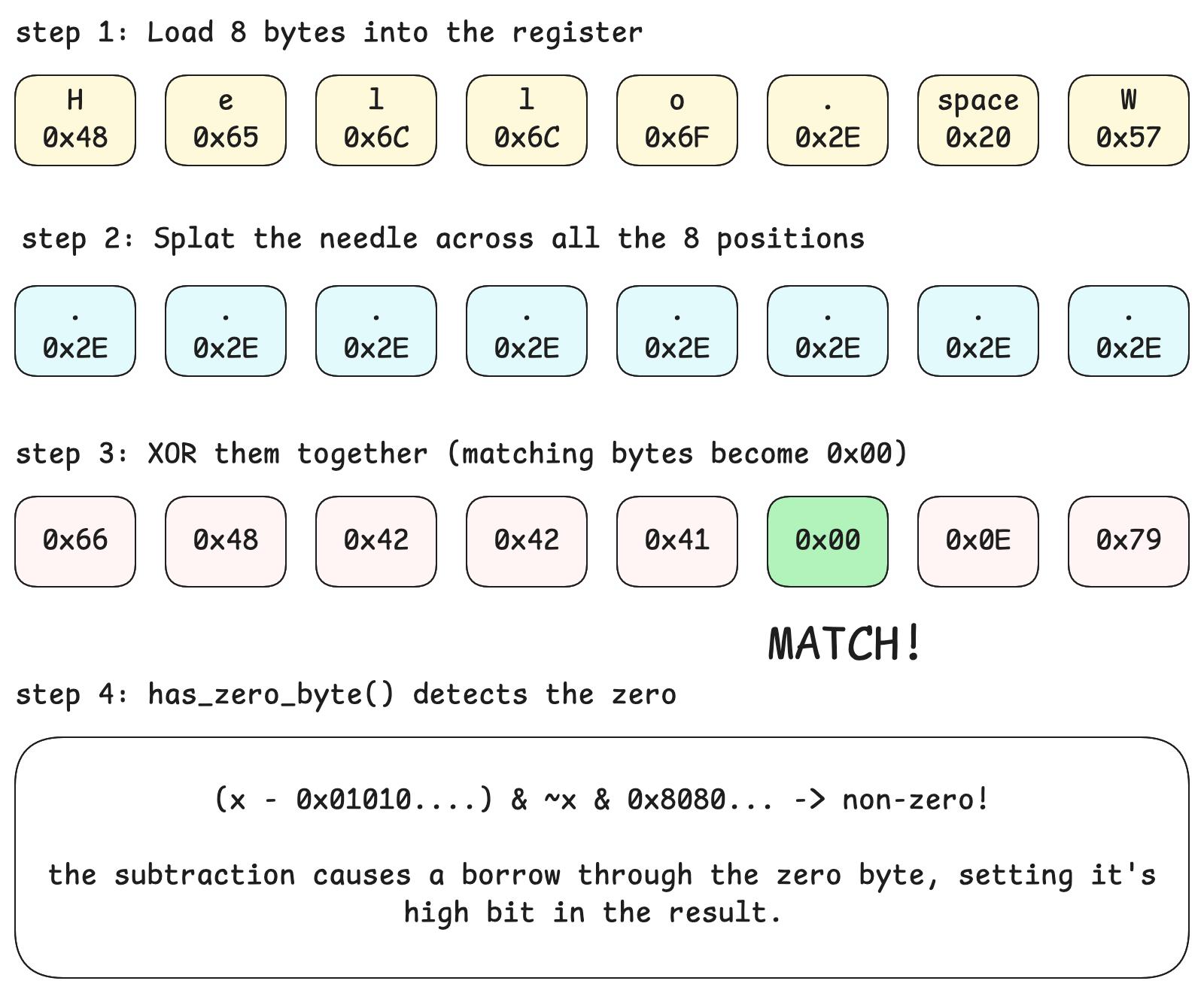 SWAR diagram
the fast path: AVX2/SSE2
on x86_64 with SIMD support, memchr upgrades to vector instructions. AVX2 processes 32 bytes at once:
// broadcast needle to all 32 lanes
let needle_vec = _mm256_set1_epi8(needle as i8);
// load 32 bytes from haystack
let chunk = _mm256_loadu_si256(haystack);
// compare all 32 bytes simultaneously
let matches = _mm256_cmpeq_epi8(chunk, needle_vec);
// extract match positions as a 32-bit mask
let mask = _mm256_movemask_epi8(matches);
if mask is non-zero, at least one byte matched. trailing_zeros() gives the position.
memchr also has a hybrid strategy: it stores both SSE2 (16-byte) and AVX2 (32-byte) searchers, using SSE2 for small haystacks and AVX2 for larger ones.
the API
memchr provides three variants:
memchr(needle, haystack)— find one bytememchr2(n1, n2, haystack)— find either of two bytesmemchr3(n1, n2, n3, haystack)— find any of three bytes
for two or three needles, it runs multiple comparisons and ORs the results together. but notice: it stops at three.
the three-character limit
why only three? from memchr's source code:
only one, two and three bytes are supported because three bytes is about the point where one sees diminishing returns. beyond this point and it's probably (but not necessarily) better to just use a simple
[bool; 256]array or similar.
each additional needle requires another comparison and OR operation. with 3 needles you're doing 3 broadcasts, 3 comparisons, and 2 ORs per 32-byte chunk. a 4th needle adds another ~33% overhead, and the gains from SIMD start looking less impressive compared to simpler approaches.
the memchr authors explicitly chose not to implement memchr4 or beyond — it's not a limitation, it's a design decision.
so what happens when you want to split on \n, ., ?, !, and ;? that's 5 delimiters. memchr can't help directly.
the fallback: lookup tables
when you have more than 3 delimiters, we fall back to a classic technique: the 256-entry lookup table.
fn build_table(delimiters: &[u8]) -> [bool; 256] {
    let mut table = [false; 256];
    for &byte in delimiters {
        table[byte as usize] = true;
    }
    table
}

fn is_delimiter(byte: u8, table: &[bool; 256]) -> bool {
    table[byte as usize]  // single array lookup, no branching
}
this is O(1) per byte — just an array index. no loops, no comparisons, no branching. modern CPUs love this because it's completely predictable.
is it as fast as SIMD? no. but it's still really fast, and it handles arbitrary delimiter sets.
why search backwards?
there's one more trick: we search backwards from chunk_size, not forwards from 0.
if you search forward, you need to scan through the entire window to find where to split. you'd find a delimiter at byte 50, but you can't stop there — there might be a better split point closer to your target size. so you keep searching, tracking the last delimiter you saw, until you finally cross the chunk boundary. that's potentially thousands of matches and index updates.
backward search? one lookup. start at chunk_size, search backward, and the first delimiter you hit is your split point. done.
target_size = 100
text: "Hello. World. This is a test. Here's more text..."

forward search:
  - find "." at 6, save it, keep going
  - find "." at 13, save it, keep going
  - find "." at 30, save it, keep going
  - ... eventually cross boundary, use last saved position
  → multiple searches, lots of bookkeeping

backward search:
  - start at position 100, search backward
  - find "." at 30, done
  → one search, no bookkeeping
fewer operations means less overhead. we use memrchr (reverse memchr) instead of memchr for exactly this reason.
putting it together
memchunk automatically picks the right strategy:
fn find_last_delimiter(window: &[u8], delimiters: &[u8], table: Option<&[bool; 256]>) -> Option<usize> {
    if let Some(t) = table {
        // 4+ delimiters: use lookup table
        window.iter().rposition(|&b| t[b as usize])
    } else {
        // 1-3 delimiters: use SIMD-accelerated memchr
        match delimiters.len() {
            1 => memchr::memrchr(delimiters[0], window),
            2 => memchr::memrchr2(delimiters[0], delimiters[1], window),
            3 => memchr::memrchr3(delimiters[0], delimiters[1], delimiters[2], window),
            _ => None,
        }
    }
}
the table is only built once, lazily, on the first iteration. after that, it's pure speed.
benchmarks
we ran this against the other rust chunking libraries we could find:
| library | throughput | vs memchunk |
|---|---|---|
| memchunk | 164 GB/s | - |
| kiru | 4.5 GB/s | 36x slower |
| langchain | 0.35 GB/s | 469x slower |
| semchunk | 0.013 GB/s | 12,615x slower |
| llama-index | 0.0035 GB/s | 46,857x slower |
| text-splitter | 0.0017 GB/s | 96,471x slower |
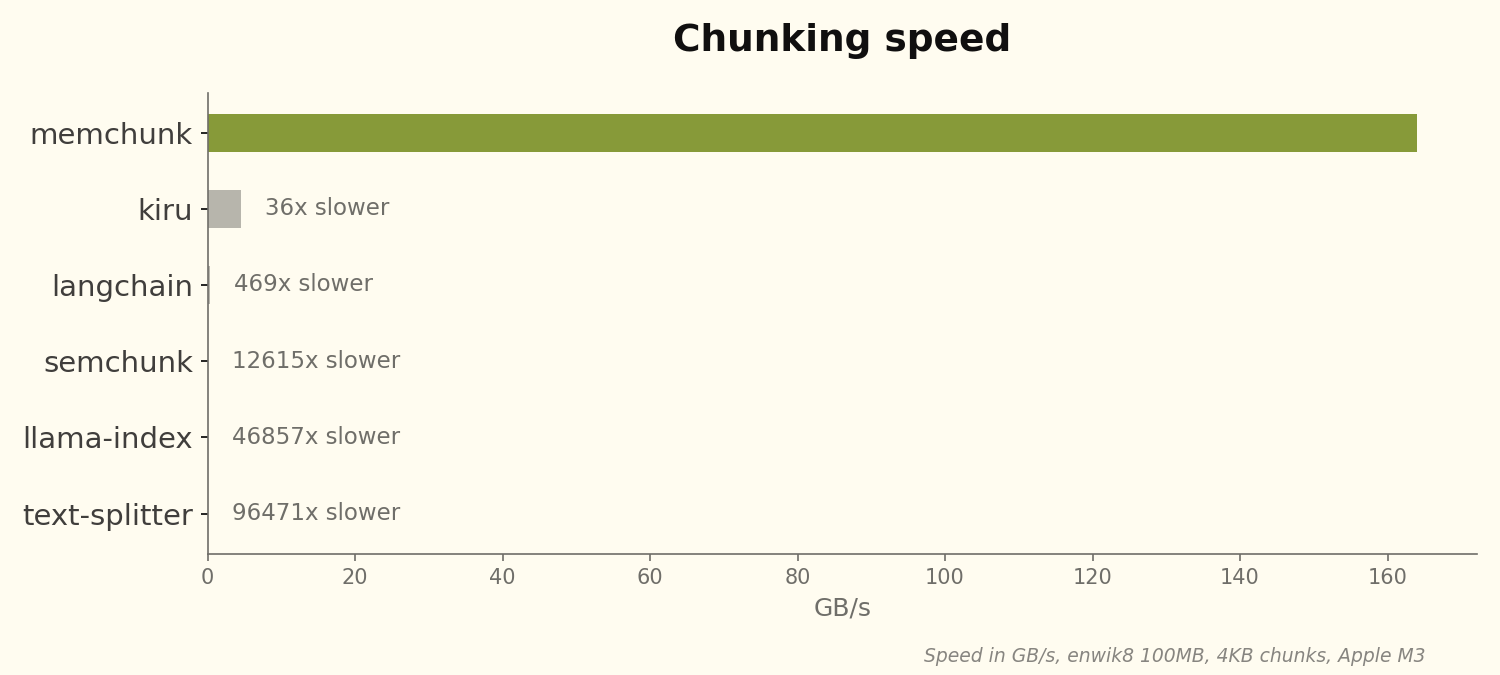 Benchmark results
the exact throughput varies with file size and delimiter count — larger files and fewer delimiters favor SIMD more. but even in pessimistic cases (small chunks, many delimiters), we're still in the hundreds of GB/s range.
for reference, that's chunking english wikipedia (~20GB) in roughly 120 milliseconds.
python and wasm bindings
since chonkie is a python library, we needed python bindings. we also added wasm for browser/node use cases.
from memchunk import chunk

text = "Hello world. How are you?"
for slice in chunk(text, size=4096, delimiters=".?"):
print(bytes(slice))import { chunk } from "memchunk";
const text = new TextEncoder().encode("Hello world. How are you?");
for (const slice of chunk(text, { size: 4096, delimiters: ".?" })) {
console.log(new TextDecoder().decode(slice));
}both return zero-copy views (memoryview in python, subarray in js), so you get most of the performance even across FFI boundaries.
wrapping up
the techniques here aren't novel — SIMD search and lookup tables are textbook stuff. the win comes from knowing when to use which:
- 1-3 delimiters → memchr's SIMD search
- 4+ delimiters → 256-entry lookup table
- minimize allocations → return offsets, let the caller slice
memchunk is on crates.io, pypi, and npm if you want to try it out.